You spend an hour on the application. You rewrite the opening line of the cover letter twice, check the file name, and send it before the deadline. Then nothing comes back — not an interview, not a rejection, not even an acknowledgement. After the twentieth time, it becomes very hard not to conclude that the problem is you.
Often it isn't. What happened to a lot of those applications is that a piece of software read the document, scored it against the job description, ranked it below the cutoff and filed it away — all before any person opened it. Not because the experience on the page was wrong, but because of how the page itself was written and built.
Most CVs aren't rejected. They're never opened.
That distinction matters, because the two problems have completely different fixes. One needs new qualifications and years of work. The other needs an afternoon with a document you already have.
The filter you didn't know you were failing
The software in question is an applicant tracking system. Large employers in Ghana use them, and so do most of the international companies hiring remotely here — anywhere a single posting attracts a few hundred applications, someone has bought software to manage the pile.
None of this is hidden or unfair, exactly. It is simply a stage of the process that nobody tells applicants about, which means most people prepare for the interview and the cover letter and give almost no thought to the one reader that sees the CV first.
How screening software actually works
The process is fairly consistent from system to system, and understanding it explains almost every piece of CV advice that follows.
Parsing
The system reads your CV and pulls out your name, contact details, work history, education and skills, slotting each into a structured database. If it can't read your layout cleanly, information gets misfiled or dropped here — before anything has even been assessed.
Keyword matching
It compares what it extracted against the job description, looking for matching skills, tools, job titles and qualifications.
Scoring and ranking
You are scored on how closely you match, then ranked against every other applicant for that role.
Human review
A recruiter opens the top-ranked applications. This is the first moment a person sees your CV, and a great many applicants never reach it.
The consequence is that formatting stops being a matter of taste. A layout that a person would find handsome can be one the parser cannot read, and a CV that cannot be parsed cannot be scored at all.
Worth knowing
A CV that can't be parsed can't be scored, however good the career it describes.
Six things to change
None of these require new skills or a new job title. They are all changes to a document you already own.
Mirror the language of the job description
Read the posting properly and use the same words it uses for skills, tools and titles — wherever they genuinely apply to you. If the role asks for “SQL” and “dashboards,” those exact words should appear on your CV, not a vaguer equivalent you happen to prefer. The system is matching strings, not reading between the lines.
Keep the layout plain, even boring
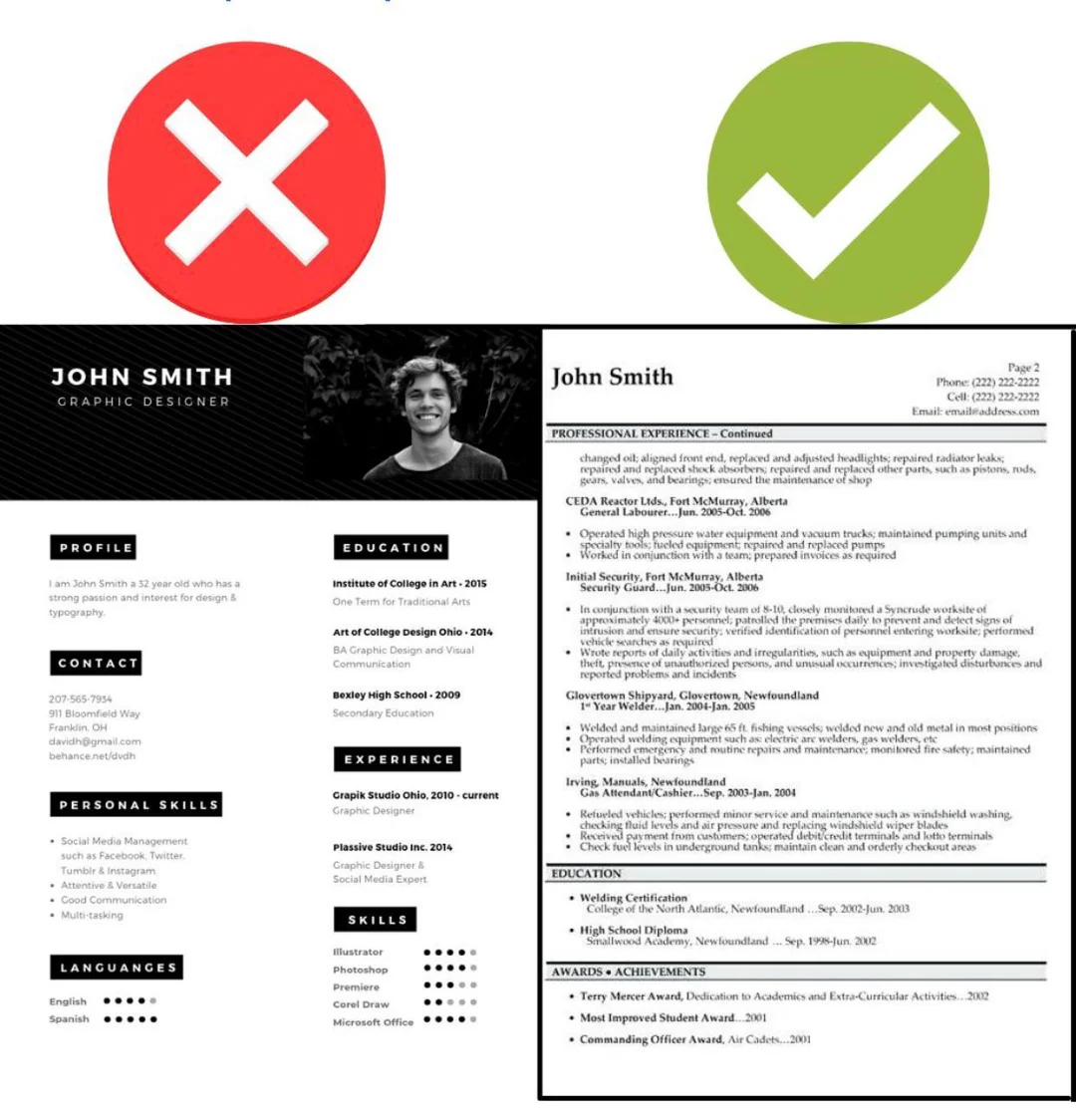
No columns, tables, text boxes, graphics or unusual fonts. These are exactly the things that confuse a parser, and they can cause whole sections to be misread or skipped. Plain genuinely outperforms creative at this stage, which is counterintuitive enough that most people have to be told twice.
Put contact details in the body, not the header
Your name, phone number and email belong in the main body of the document. Header and footer content is one of the most reliable places for information to disappear, and losing your phone number is a spectacular way to lose an interview.
Use conventional section headings
“Work Experience.” “Education.” “Skills.” Headings like “My Journey” or “What I Bring” may read beautifully to a human and still stop the software categorising your information correctly. Save the personality for the interview.
Quantify achievements instead of listing duties
“Managed social media” says almost nothing. “Grew an Instagram following from 500 to 4,000 in six months” says a great deal. Numbers do double duty here: they give the parser something concrete and they give the recruiter a reason to keep reading.
Tailor it for each application
One generic CV sent to thirty roles will reliably underperform five tailored ones. Adjusting the wording to match each specific posting is the highest-impact habit on this list, and the one most people skip because it feels like work for no visible reward.
Quick do's and don'ts
Do
- Save as .docx unless the employer asks for something else
- Spell out acronyms on first use — Search Engine Optimisation (SEO)
- Use standard fonts such as Arial or Times New Roman
- Use simple bullet points rather than symbols or icons
- Keep dates in one consistent, readable format
Don't
- Use multi-column or infographic-style templates
- Put key information inside images or graphics
- Rely on tables to structure your experience
- Use decorative fonts or unusual bullet symbols
- Send the identical CV to every role
Why gaming it backfires
Once people learn a machine is reading first, the instinct is to write for the machine. Two tricks circulate widely: repeating keywords until the density looks irresistible, and hiding extra terms in white text so that only the parser sees them.

Both fail for the same reason. Plenty of systems convert your CV to plain text for the recruiter to read, and white text is not white any more once that happens. What was meant to look clever arrives looking dishonest, and it usually ends the application on the spot.
The aim isn't to beat the filter. It's to be legible to the machine and persuasive to the person behind it.
Give your CV something to say
All of this assumes there is something real behind the document. Formatting gets you read; it doesn't get you hired. The candidates who convert are the ones with concrete, quantifiable work to point at — a project that shipped, a number that moved, something a recruiter can ask a follow-up question about.
That is the gap worth closing next, and it's the one Prodigee's project-based tracks are built around: finish a course, and you finish with work you can describe in a line of your CV rather than a certificate to list at the bottom of it.
Build something worth putting on the page
Project-based course tracks that leave you with real, demonstrable work — not just a certificate.
Browse coursesFrequently asked questions
- What is an applicant tracking system (ATS)?
- Software many employers use to manage job applications. It parses your CV into structured data, scans it for keywords matching the job description, then scores and ranks candidates so recruiters review the top-ranked applications first.
- Should I send my CV as a PDF or a Word document?
- Both are generally accepted, but Word (.docx) tends to be the safer default, since some systems struggle to extract text cleanly from image-based or heavily layered PDFs.
- Do creative or designed CVs help me stand out?
- Usually the opposite. Columns, tables, text boxes and unusual fonts can confuse the parser, meaning key information gets lost or misread. Clean and plain performs better through screening.
- Can I trick the system by hiding keywords in white text?
- No, and it's a bad idea. Many systems convert your CV to plain text for the recruiter, making hidden keywords immediately visible. It reads as dishonest and typically removes you from consideration.
References
This article draws on the following sources, linked so you can read further.
- Your Guide to Applicant Tracking Systems: What They Are and How to Stand Out, LSE CareersWalkthrough of the parsing, scoring and human review stages, plus common myths about creative CVs.
- ATS-Friendly Resume: 18 Tips to Pass Applicant Tracking Systems, IndeedChecklist covering keywords, date formatting, acronyms and file format choices.
- How to Make an ATS-Friendly Resume, TopResumeResearch on parsing failures, including contact details placed in headers and footers.
- Navigating the Applicant Tracking System: A Job Guide, CourseraGuidance on tailoring content and why keyword stuffing and hidden text backfire.
- Is Your CV Optimized for Applicant Tracking Systems?, Africa Career NetworksAfrica-focused guidance on formatting, section headings and CV customisation for graduates.